Installing the Vector Tiles Extension
-
Login, and navigate to About & Status > About GeoServer and check Build Information to determine the exact version of GeoServer you are running.
-
Visit the website download page, change the Archive tab, and locate your release.
From the list of Output Formats extensions download Vector Tiles.
- 3.1.0 example: vectortiles
- 3.1.0-SNAPSHOT example: vectortiles
Verify that the version number in the filename corresponds to the version of GeoServer you are running (for example 3.1.0 above).
-
Extract the archive and copy the contents into the GeoServer library
WEB-INF/libdirectory located in:- GeoServer binary Jetty:
<GEOSERVER_ROOT>/webapps/geoserver/WEB-INF/lib - Default Tomcat deployment:
<CATALINA_BASE>/webapps/geoserver/WEB-INF/lib
- GeoServer binary Jetty:
-
Restart GeoServer.
To verify that the extension was installed successfully
-
Open the Web administration interface
-
Click Layers and select a vector layer
-
Click the Tile Caching tab
-
Scroll down to the section on Tile Formats. In addition to the standard GIF/PNG/JPEG formats, you should see the following:
application/json;type=geojsonapplication/json;type=topojsonapplication/vnd.mapbox-vector-tile
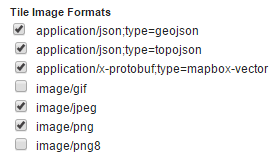
Vector tiles tile formats
If you don't see these options, the extension did not install correctly.