GWC Hazelcast tile cache plugin
This plugin adds two Hazelcast backends to the in-memory tile cache, so that the cached tiles are shared by every node of a GeoServer cluster. A tile rendered by one node is then served by every other node until it expires, and a truncate on one node removes the tile for all of them.
Installing the plugin
-
Download the extension from the nightly GeoServer community module builds.
Warning
Make sure to match the version of the extension to the version of the GeoServer instance!
-
Extract the contents of the archive into the
WEB-INF/libdirectory of the GeoServer installation, on every node.
Removing the plugin while a Hazelcast backend is selected does not stop GeoServer: the in-memory tile cache becomes unusable, with the reason in the log, and tiles are served without it. The Hazelcast settings are kept, so that installing the plugin again restores them. Select another backend in the caching defaults page to use the cache meanwhile.
Choosing a backend
Once installed, the Backend list of the in-memory tile cache, in the Caching Defaults page, offers two more entries:
- Hazelcast client (shared by all nodes): GeoServer connects to a separate Hazelcast cluster, which holds the tiles. GeoServer nodes stay small, and the cluster is sized and restarted on its own.
- Hazelcast embedded (shared by all nodes): each GeoServer node becomes a member of the cluster and holds a share of the tiles in its own memory. There is no separate service to run, at the cost of more memory on each node.
Hazelcast open source has no authentication nor encryption. The cluster must only be reachable from the GeoServer nodes, for example on a private network or with Kubernetes network policies, as anyone reaching it can read and change the cached tiles.
Both backends read their Hazelcast configuration file, if any, from the same directory as geowebcache.xml: by default the gwc directory of the data directory, or the one set by GEOWEBCACHE_CONFIG_DIR, else by GEOWEBCACHE_CACHE_DIR. Changes to these files apply on restart.
The plugin is independent from the Hazelcast Clustering Plugin. When both are installed, give the two clusters different names and ports.
Hazelcast client
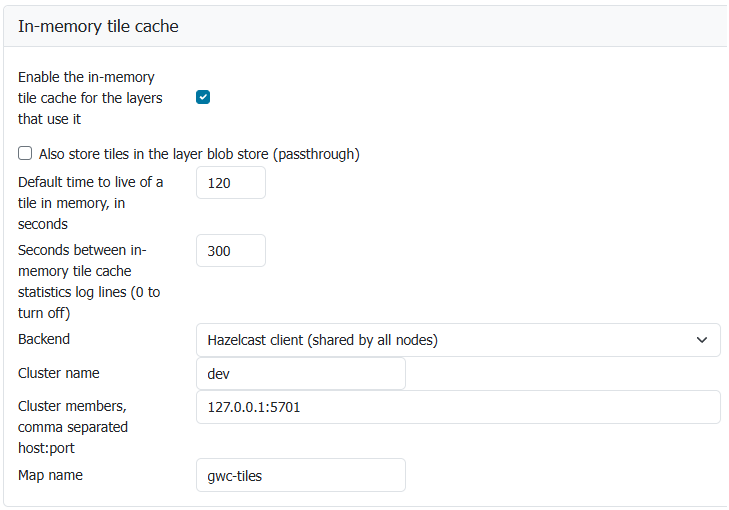
Hazelcast client backend
- Cluster name: the name of the Hazelcast cluster,
gwcby default. It must match thecluster-nameof the members, which isdevin a stock Hazelcast configuration. - Cluster members: comma separated
host:portlist of cluster members,localhost:5701by default. One reachable member is enough, the others are found from it. - Map name: the map holding the tiles,
gwc-tilesby default. It must be declared on the cluster, see Declaring the map.
Cluster name and cluster members apply on restart only: GeoServer connects once, the first time the cache is used, and keeps that connection until it stops. Saving new values, or reloading the configuration, does not change it, so after fixing a wrong member address restart every node. The map name applies on save. If the connection stops for good, for example because the cluster rejects GeoServer, a new one is opened with the same settings, at most every 30 seconds, with a warning in the log.
GeoServer starts even when the cluster is down. Tiles are then served without the cache, and GeoServer keeps trying to connect in the background, waiting up to 30 seconds between attempts. Reading or writing a tile waits at most 2 seconds for the cluster, see Timeouts.
For settings not available in the page, such as discovery or timeouts, place a hazelcast-client.xml file next to geowebcache.xml, following the Hazelcast client configuration. When present, it replaces the cluster name, the members and the connection defaults: the values in the page are then ignored, except the 5 seconds request timeout and the retry multiplier (2) and jitter (0.2), kept unless the file sets hazelcast.client.invocation.timeout.seconds, multiplier or jitter itself. It is to be noted that GeoServer always connects in the background and retries forever, whatever the file says, so that an unreachable cluster never stops GeoServer: a finite cluster-connect-timeout-millis is ignored, with a warning in the log. The map name is still taken from the page. Changes to the file, like the page connection settings, apply on restart only.
Hazelcast embedded
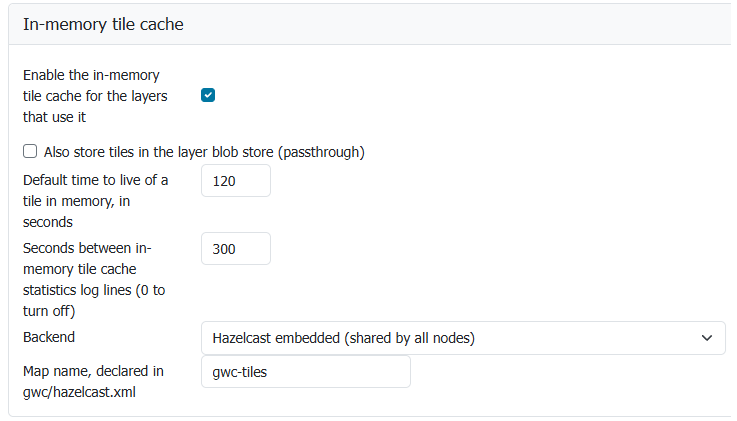
Hazelcast embedded backend
- Map name: the map holding the tiles,
gwc-tilesby default.
The member is configured by a hazelcast.xml file, mandatory, next to geowebcache.xml, following the Hazelcast member configuration.
The node joins the cluster in the background when the cache is first used. Tile requests do not wait for it, they are served without the cache until the node has joined, and the log reports the cache unreachable then reachable again. A missing file, or a file not declaring the map, leaves the cache unusable, with the reason in the log, while tiles keep being served without it. A node that fails to start its member, or whose member stops later, for example after running out of memory or through a cluster shutdown, starts a new one when the cache is next tried, at most every 30 seconds.
The following example fits a Kubernetes deployment, where the GeoServer pods find each other through a service. The pods need permission to read endpoints and pods in their namespace:
<hazelcast xmlns="http://www.hazelcast.com/schema/config">
  <cluster-name>gwc</cluster-name>
  <network>
    <join>
      <multicast enabled="false"/>
      <kubernetes enabled="true">
        <namespace>geoserver</namespace>
        <service-name>geoserver-hazelcast</service-name>
      </kubernetes>
    </join>
  </network>
  <map name="gwc-tiles">
    <backup-count>1</backup-count>
    <eviction eviction-policy="LRU" max-size-policy="USED_HEAP_PERCENTAGE" size="25"/>
  </map>
</hazelcast>
Declaring the map
With both backends, the map must be declared in the cluster configuration with an eviction policy and a size bound. A map without them grows until the members run out of memory, as Hazelcast keeps every entry by default. The embedded backend refuses to start on an undeclared map. The client backend cannot check it, so review the cluster configuration by hand.
The time to live does not need to be declared, as each tile is stored with its own.
backup-count sets how many other members keep a copy of each tile. With 1, losing a member loses no tiles, at the cost of twice the memory. With 0, the tiles of a lost member are rendered again.
The first truncate adds a sorted index on the map keys, so that removing the tiles of a layer, gridset or parameter set looks up the matching keys instead of reading every tile on the members. The index costs some memory per tile on the members and a little time on every write, so size the members for it: an entry count limit does not account for it. To keep the cluster configuration under your control, declare it with the map instead:
<map name="gwc-tiles">
  <indexes>
    <index type="SORTED">
      <attributes>
        <attribute>__key</attribute>
      </attributes>
    </index>
  </indexes>
</map>
An index added by GeoServer is lost when the whole cluster restarts, and added again by the next truncate. If it cannot be added, for example when the cluster configuration refuses it, truncates still run without it, reading every tile on the members, with a warning in the log, and the next truncate tries again.
Timeouts
Every cache call runs while the request holds a lock shared by all the GeoWebCache tile requests of the node, so a slow cluster slows down every layer, not only the cached ones. In particular, a member that is still connected but does not answer, for example during a long garbage collection pause or while partitions move after a member joins or leaves, is not detected by the Hazelcast request timeout: a call then waits until the connection is declared dead, 60 seconds by default.
Reading or writing a tile gives up after 2 seconds, and the cache is then treated as down: requests are served without it, and the node tries it again from time to time. The limit can be changed with the GWC_MEMORYCACHE_CALL_TIMEOUT system property, servlet context parameter or environment variable, in milliseconds. It applies when the caching defaults are next saved or on restart. It is to be noted that a write giving up may still reach the cluster later. The limit does not apply when, with passthrough on, a tile read from the blob store is copied into the cache: that write waits until the connection is declared dead.
Truncating, or clearing the cache, gives up after 10 seconds for each call to the cluster, a longer limit, as removing many tiles takes time even on a healthy cluster. The truncate then reports an error: retry it once the cluster answers again. The limit can be changed with the GWC_MEMORYCACHE_BULK_TIMEOUT system property, servlet context parameter or environment variable, in milliseconds. It applies when the caching defaults are next saved or on restart. It is to be noted that a removal giving up may still complete on the cluster later.
The cluster-wide locks do not use these limits. For them, and to drop a dead connection sooner, the following client settings are suggested, either as <property> elements of hazelcast-client.xml or as Java system properties (-Dname=value):
| Property | Hazelcast default | Suggested | Effect |
|---|---|---|---|
hazelcast.client.heartbeat.timeout |
60000 | 15000 | Milliseconds without an answer before a connection is closed and its pending calls fail. Much lower values make member garbage collection pauses close connections for nothing. |
hazelcast.client.heartbeat.interval |
5000 | 5000 | Milliseconds between two heartbeats, keep it well below the timeout. |
hazelcast.client.max.concurrent.invocations |
unlimited | 10000 | Calls waiting for an answer, beyond which new calls fail at once instead of piling up in memory while the cluster is stalled. |
For example, in hazelcast-client.xml:
<properties>
  <property name="hazelcast.client.heartbeat.timeout">15000</property>
  <property name="hazelcast.client.max.concurrent.invocations">10000</property>
</properties>
With the embedded backend, the node is a member and these client settings do not apply. Do not lower hazelcast.max.no.heartbeat.seconds for this: it is how long a silent member stays in the cluster, so a garbage collection pause longer than that removes the member and moves its tiles to the others. To have calls to a member that stops answering fail sooner, lower hazelcast.operation.call.timeout.millis in hazelcast.xml instead, 60000 by default, 15000 suggested. A long call on a member that still answers is not affected, as members report the calls they are still running.
Truncation
Truncating by bounding box reads the keys of each affected zoom level, for one parameter set and format, into the memory of the node doing it, and removes the tiles inside the box. Above 100,000 tiles in a zoom level it removes the whole zoom level instead, with a warning in the log the first time and an information line after, so that the node memory stays bounded: the extra tiles are rendered again when requested. The limit can be changed with the GWC_MEMORYCACHE_MATCHING_LIMIT system property, servlet context parameter or environment variable, 0 always removing the whole zoom level; it applies when the caching defaults are next saved or on restart.
Cluster-wide tile locks

Selecting the Hazelcast cluster locking
When a tile is missing from the cache, a node renders its whole metatile, and other requests for the same metatile on that node wait for it instead of rendering it again. By default this lock works inside one node only: when several nodes miss the same metatile at the same time, for example right after its tiles expired, each of them renders it, with its own queries to the data source. With N nodes a metatile can be rendered up to N times.
The plugin adds Hazelcast cluster locking to the Tile locking mechanism list of the Caching Defaults page. With it, one node renders the metatile, and the others wait, then serve the tiles from the shared cache. It is not selected by default: enable it when the data source load right after tiles expire is a problem.
- It needs the in-memory tile cache enabled with a Hazelcast backend, as the locks are kept on the same cluster. Otherwise the nodes keep locking on their own, with a warning in the log. Disabling the cache, or switching it to another backend, takes the node back to its own locks as soon as the page is saved.
- It is meant for this setting only. Do not also name it as the
lockProviderofgeowebcache.xml, which the blob stores use: the S3 blob store, for one, holds a lock for the whole of a bulk delete, often longer thanGWC_LOCK_TIMEOUT, so the lock would expire under it while other nodes wait for it. - It applies to every layer, including layers not using the in-memory cache, whose tiles are then rendered once for the shared blob store.
- It applies at once on the node where the page is saved. The other nodes pick it up on restart, and until then they only render some metatiles twice.
- The locks are kept in a map named after the tile map with a
.lockssuffix,gwc-tiles.locksby default. It holds no entries, so it does not need to be declared on the cluster.
A node never fails a request because of the cluster locks. When the cluster cannot be reached, or while the cache considers it down after a failed call, nodes go back to locking on their own at once, without waiting on the cluster, until it is back, and a metatile may then be rendered once per node. A node waits for a lock at most the number of seconds set by the GWC_LOCK_TIMEOUT system property, 120 by default, then renders the metatile anyway, with a warning in the log.
It is to be noted that a node stopping while it renders keeps its lock until the cluster notices, and at most GWC_LOCK_TIMEOUT seconds: requests for that metatile on other nodes wait until then. Lowering GWC_LOCK_TIMEOUT shortens this wait, but a metatile taking longer than that to render may then be rendered twice.