Migrating from the legacy OAuth2/OIDC plugins
GeoServer 3.0 replaced the separate Spring Security 5 era authentication plugins with a single OpenID Connect / OAuth2 connector. The old filters and the Keycloak role service no longer exist, so their persisted configuration in a data directory created by GeoServer 2.x can no longer be loaded.
This page explains what happens when GeoServer 2.x data directory is opened by GeoServer 3.x, and how to migrate each legacy authentication filter to the new connector.
Before you migrate: keep a non-OAuth admin login
Warning
If an OAuth2/OIDC filter is the only authentication filter on your web and/or rest chains, upgrading can lock you out: GeoServer 3.x disables the unresolvable filter and, because the chain is then left with no authenticator, injects a fail-closed deny filter that returns 403 for that chain. Likewise, if the Keycloak role service supplied your administrator roles, it is disabled on upgrade and the active role service falls back to the built-in default one, which may not grant those roles.
Before opening the data directory with GeoServer 3.x, make sure you have a working username/password login that does not depend on OAuth:
- Keep (or add) an XML user/group service --- the built-in
defaultone is fine --- containing a user with the ADMIN role. - Keep a
basicauthentication filter on therestchain and aform(and/orbasic) authentication filter on thewebchain, alongside the OAuth filter, so a password login still works once the OAuth filter is gone. The built-in root account (the master password) authenticates through those filters regardless of the role service, so it remains a reliable recovery login. - Confirm you can actually log in with that username/password (not just through the IdP) before upgrading.
With a password login in place, a disabled OAuth filter or role service becomes a recoverable migration step rather than a lockout: sign in with the password account, then follow the migration procedure to reconfigure the new connector.
Reusing a GeoServer 2.x data directory
GeoServer 3.x does not fail to start when it finds security filters or role services created by a removed or uninstalled plugin. Instead it degrades gracefully:
- the offending component is disabled and removed from every authentication filter chain that referenced it;
- the problem is reported on the GeoServer home page (visible to administrators), naming the component and, when the OpenID Connect module is installed, the plugin that originally created it;
- the on-disk configuration is left untouched --- nothing is rewritten, so the data directory keeps working with the older GeoServer until you migrate it.
For example, opening a GeoServer 2.x data directory whose web chain used an openIdConnectAuthentication filter named keycloak-oidc produces, on the administrator home page:
The following security components could not be loaded and have been disabled. They were most likely created
by a community plugin that is not installed in this GeoServer; reconfigure or remove them and restart GeoServer:

  * keycloak-oidc (gs-sec-oauth2-openid-connect (OpenID Connect / Azure AD)): Created by the no longer installed
    plugin gs-sec-oauth2-openid-connect (OpenID Connect / Azure AD); reconfigure it with the current
    authentication connector.

The following authentication filter chains were updated as a result:

  * "web": removed [keycloak-oidc]
and the matching startup log line:
WARN [geoserver.security] - Disabled security filter(s) [keycloak-oidc] were removed from chain 'web'
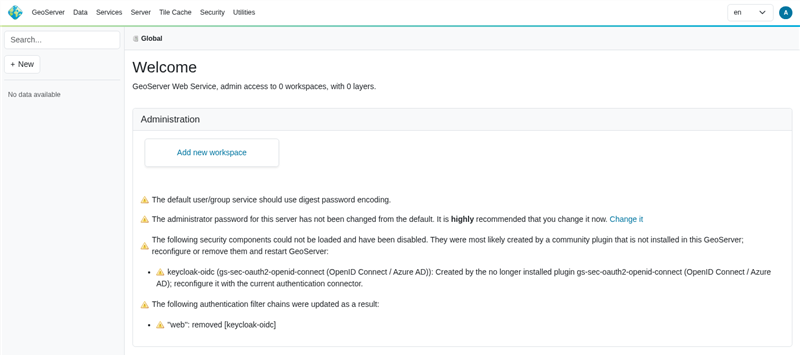
Administrator home page listing the disabled legacy security components and the affected filter chains.
Note
Tolerance is generic and lives in GeoServer core, so even a vanilla GeoServer without the OpenID Connect module will start and disable the unknown filters --- it just reports them with a generic message instead of naming the originating plugin.
Removing the filter never exposes protected resources (fail-closed)
Removing a disabled authentication filter from a chain never grants access:
- chains that still have a security interceptor continue to enforce their access rules, so an unauthenticated request is treated as anonymous and denied for protected resources;
- if removing the filter would leave a chain with no authentication filter and no interceptor, GeoServer injects a fail-closed filter that returns
403 Forbiddenfor that chain, so a previously protected chain can never silently become open.
Recognized legacy filters
When the OpenID Connect module is installed, the following legacy components are recognized and reported by name:
| Legacy plugin | Persisted alias | Migrate to |
|---|---|---|
gs-sec-oauth2-openid-connect |
openIdConnectAuthentication |
OpenID Connect provider |
| Azure AD / Microsoft Entra (via the OpenID Connect plugin) | openIdConnectAuthentication |
Microsoft / OpenID Connect provider |
gs-sec-keycloak (filter) |
keycloakAdapter |
OpenID Connect provider (Keycloak realm) |
gs-sec-keycloak (role service) |
keycloakRoleService |
role source on the OpenID Connect filter |
gs-sec-oauth2-google |
googleOauth2Authentication |
Google provider |
gs-sec-oauth2-github |
githubOauth2Authentication |
GitHub provider |
gs-sec-oauth2-geonode |
geoNodeOauth2Authentication |
OpenID Connect provider (GeoNode) |
Migration procedure
The new connector is a single OAuth2/OpenID Connect authentication filter that supports several providers at once. For each disabled legacy filter:
- In Security -> Authentication, create a new OAuth2/OpenID Connect authentication filter.
- Configure the matching provider with the values from your old filter (see the per-provider notes below).
- Add the new filter to the authentication filter chains where the old one used to sit (typically the
weband/orrestchains), ahead of theanonymousfilter. - Remove the obsolete filter directory under
security/filter/<name>(and, for Keycloak, the obsolete role service undersecurity/role/<name>) from the data directory. - Restart GeoServer. The home page warning clears once the obsolete configuration is gone.
Note
When does the warning clear? It is rebuilt only when the security subsystem re-initializes --- at startup, or when the global Security -> Authentication settings are saved --- so refreshing the home page on its own never changes it. The warning has two independent parts:
- The following authentication filter chains were updated clears as soon as no chain still references the unknown filter --- saving the Authentication page already rewrites the chains without it.
- The following security components could not be loaded clears only once the obsolete
security/filter/<name>(and, for Keycloak,security/role/<name>) directory is removed from the data directory.
A disabled component is not listed among the Authentication filters, so it cannot be removed with the Remove selected button --- delete its directory on disk, then restart GeoServer, which is the reliable way to re-evaluate both parts.
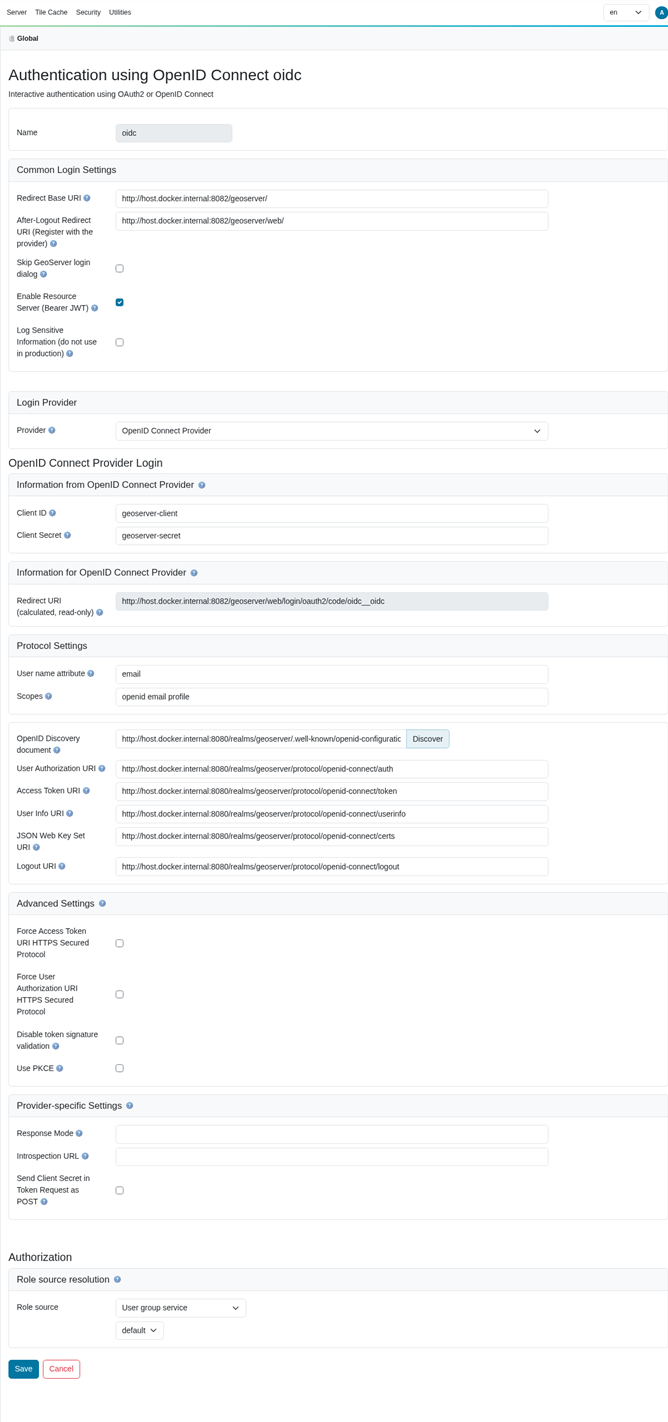
The unified OpenID Connect login filter configured for a generic OpenID Connect provider (Keycloak): discovery populated the endpoints, and the read-only Redirect URI shows the <baseUrl>/web/login/oauth2/code/<filterName>__oidc value to register with the IdP.
Note
This migration path was validated end to end against Keycloak: a GeoServer 2.x data directory with an openIdConnectAuthentication filter was opened by GeoServer 3.0 (filter disabled and stripped from the web chain, warning shown), a new OpenID Connect Login filter was configured for the same realm, and an interactive login succeeded. The new connector issues a standards-compliant authorization request with PKCE (code_challenge_method=S256), a CSRF state and an OIDC nonce, and properly URL-encodes the requested scopes --- none of which the legacy redirect entry point did. A principal that resolves no roles from the configured role source is still authenticated (granted ROLE_AUTHENTICATED) rather than failing.
legacy-openid-connect -> OIDC
Carry over the client id, client secret, the authorization / token / user-info endpoints and the scopes from the old openIdConnectAuthentication filter to the OpenID Connect provider of the new filter. The role source (ID token, access token, user-info, or Microsoft Graph) maps to the corresponding role source on the new filter.
legacy-azure -> OIDC
Azure AD / Microsoft Entra was never a separate plugin --- it was the OpenID Connect filter pointed at the Azure tenant endpoints. Migrate it exactly like legacy-openid-connect, using the Microsoft / Azure tenant discovery URL (https://login.microsoftonline.com/<tenant>/v2.0). If roles were resolved through Microsoft Graph, select the Microsoft Graph role source on the new filter.
legacy-keycloak -> OIDC
The old Keycloak adapter is replaced by the OpenID Connect provider pointed at your Keycloak realm (https://<host>/realms/<realm>/.well-known/openid-configuration). Map the adapter resource / credentials to the client id / client secret. If you used the keycloakRoleService to fetch roles from the Keycloak admin API, configure the equivalent role source on the new filter instead of a separate role service.
legacy-geonode -> OIDC
Migrate the GeoNode OAuth2 filter to the OpenID Connect provider pointed at the GeoNode o/ OAuth2 endpoints, carrying over the client id, client secret and redirect URI.
Note
gs-sec-oauth2-google and gs-sec-oauth2-github migrate the same way, using the Google and GitHub providers of the new connector respectively.
Configuration field changes
The new connector is a single OAuth2/OpenID Connect filter that supports Google, GitHub, Microsoft / Azure AD and a generic OpenID Connect provider in one place (use the generic OpenID Connect provider for Keycloak, GeoNode and any standards-compliant IdP). The differences below are what an administrator has to account for when migrating; the values shown are illustrative.
Redirect / callback URL --- must be updated at the IdP
This is the change most likely to break a migrated login if it is missed. The legacy filters used the GeoServer base URL as the OAuth2 redirect_uri (for example https://geoserver.example.org/geoserver) together with a fixed, provider-specific login path such as /j_spring_oauth2_openid_connect_login.
The new connector follows the Spring Security 6 convention. Each enabled provider of a login filter has its own callback (redirect) URI, shown read-only as Redirect URI in that provider's section of the filter configuration page. Copy that exact value into your IdP rather than constructing it by hand. The values follow these patterns:
<baseUrl>/web/login/oauth2/code/google              # built-in Google provider
<baseUrl>/web/login/oauth2/code/gitHub              # built-in GitHub provider
<baseUrl>/web/login/oauth2/code/microsoft           # built-in Microsoft / Azure AD provider
<baseUrl>/web/login/oauth2/code/<filterName>__oidc  # generic OpenID Connect provider
The built-in Google, GitHub and Microsoft providers use a fixed provider key. The generic OpenID Connect provider --- used for Keycloak, GeoNode, and any standards-compliant IdP --- instead embeds the filter name, so multiple OpenID Connect filters each get a distinct callback. For a filter named oidc with the base URL https://geoserver.example.org/geoserver the OpenID Connect callback is:
The base URL is resolved from the PROXY_BASE_URL environment variable, then the Proxy Base URL global setting, then the current request, so make sure your Proxy Base URL is set correctly behind a reverse proxy.
Warning
Register the exact Redirect URI shown on the filter page as an allowed redirect URI at your IdP before switching over, and remove the old one. Because the OpenID Connect path embeds the filter name, multiple OpenID Connect filters each get a distinct callback URL --- they must each be registered separately.
The login is now started from <baseUrl>/web/oauth2/authorization/<filterName>__<provider> (replacing the legacy /j_spring_oauth2_*_login endpoints), and the post-logout redirect defaults to <baseUrl>/web/ --- register that as an allowed post-logout redirect URI if your IdP enforces a list.
GeoServer field renames
| Legacy field | New field (generic OIDC provider) | Change |
|---|---|---|
cliendId (sic) / clientSecret |
oidcClientId / oidcClientSecret |
renamed (typo fixed, provider-scoped) |
userAuthorizationUri / accessTokenUri |
oidcAuthorizationUri / oidcTokenUri, or a single oidcDiscoveryUri |
renamed; discovery preferred |
jwkURI |
oidcJwkSetUri |
renamed |
checkTokenEndpointUrl / introspectionEndpointUrl |
oidcUserInfoUri / oidcIntrospectionUrl |
renamed |
principalKey |
oidcUserNameAttribute |
renamed |
scopes |
oidcScopes (default openid) |
renamed, provider-scoped |
sendClientSecret |
oidcAuthenticationMethodPostSecret |
renamed (secret in POST body vs. Authorization header) |
usePKCE |
oidcUsePKCE |
renamed |
enforceTokenValidation (default true) |
disableSignatureValidation (default false) |
inverted --- leave signature validation enabled |
allowBearerTokens |
enableResourceServerMode |
renamed |
redirectUri / loginEndpoint / logoutEndpoint |
(removed --- computed, see above) | removed |
tokenRolesClaim / postLogoutRedirectUri |
tokenRolesClaim / postLogoutRedirectUri (now common to all providers) |
unchanged / moved |
Changes to register with your Identity Provider
When you reconfigure the IdP / OAuth2 client, make sure you:
- Redirect URI --- replace the old base-URL callback with the new
<baseUrl>/web/login/oauth2/code/<filterName>__<provider>value (and the matching post-logout redirect<baseUrl>/web/). - Discovery --- the new connector can read everything from
<issuer>/.well-known/openid-configuration(oidcDiscoveryUri); prefer it over entering each endpoint by hand. - Scopes --- confirm the requested scopes (default
openid); the legacy provider-specific defaults are no longer pre-filled. - Client authentication / PKCE --- set
oidcAuthenticationMethodPostSecret/oidcUsePKCEto match what the IdP requires.
Per-provider notes:
- Keycloak --- there is no Keycloak adapter JSON any more. Use the generic OpenID Connect provider with
oidcDiscoveryUri = https://<host>/realms/<realm>/.well-known/openid-configurationand the client id / secret from your Keycloak client. To resolve roles from the Keycloak Admin API, set the role source toKeycloakAPIand grant the client's service account therealm-managementrolesview-realm,view-usersandview-clients; optionally list extra client ids inkeycloakAdminClientIdsOfRoleScopes. - Azure AD / Microsoft Entra --- use the Microsoft provider with the tenant discovery URL
https://login.microsoftonline.com/<tenant>/v2.0. To resolve roles/groups from Microsoft Graph, enablemsGraphMemberOf/msGraphAppRoleAssignments, grant the app registration the application Graph permissionsDirectory.Read.All(groups) andAppRoleAssignment.Read.All(app roles), and provide the Enterprise Application Object ID (not the client id) inmsGraphAppRoleAssignmentsObjectId. - GeoNode --- use the generic OpenID Connect provider pointed at the GeoNode
o/OAuth2 endpoints (authorize / token / userinfo), carrying over the client id, client secret and scopes.