Caching defaults
The Caching Defaults page shows the global configuration options for the tile caching functionality in GeoServer, an embedded GeoWebCache.
GWC Provided Services
In addition to the GeoServer endpoints, GeoWebCache provides other endpoints for OGC services. For example, the GeoServer WMS endpoint is available at:
http://GEOSERVER_URL/wms?...
The GeoWebCache WMS endpoint is:
http://GEOSERVER_URL/gwc/service/wms?...
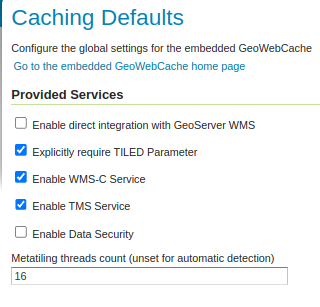
Provided services
The following settings describe the different services that can be enabled with GeoWebCache.
Enable direct integration with GeoServer WMS
Direct integration allows WMS requests served through GeoServer to be cached as if they were received and processed by GeoWebCache. This provides all the advantages of using a tile server while still employing the more-flexible GeoServer WMS as a fallback. See the section on Using GeoWebCache for more details about this feature.
With direct integration, tile caching is enabled for all standard WMS requests that contain the tiled=true parameter and conform to all required parameters.
This setting is disabled by default. When enabling this option, it is a good idea to also turn on Disk Quotas as well, to prevent unbounded growth of the stored tiles.
Explicitly require TILED Parameter
When this parameter is checked direct WMS integration requires that the tiled=true parameter be set in all requests that will be cached. If this parameter is unchecked all incoming requests will be considered for caching, the request must still conform to all required parameters.
Enable WMS-C Service
Enables the Cached Web Map Service (WMS-C) service. When this setting is enabled, GeoWebCache will respond to its own WMS-C endpoint:
http://GEOSERVER_URL/gwc/service/wms?SERVICE=WMS&VERSION=1.1.1&TILED=true&...
When the service is disabled, calls to the capabilities document will return a Service is disabled message.
Enable TMS Service
Enables the Tiled Map Service (TMS) endpoint in GeoWebCache. With the TMS service, GeoWebCache will respond to its own TMS endpoint:
http://GEOSERVER/URL/gwc/service/tms/1.0.0
When the service is disabled, calls to the capabilities document will return a Service is disabled message.
Enable WMTS Service
Enables the Web Map Tiled Service (WMTS) endpoint in GeoWebCache. When this setting is enabled, GeoWebCache will respond to its own WMTS endpoint:
http://GEOSERVER/URL/gwc/service/wmts?...
When the service is disabled, calls to the capabilities document will return a Service is disabled message.
HTTP RESTful API is available through the existing GWC integration allowing clients to retrieve the following resources:
capabilities document
tile
feature info
For more information read GWC WMTS documentation.
Enable Data Security
Enables the GeoServer Data Security in the embedded GeoWebCache.
Metatiling threads count
This setting determines the number of threads that will be used to encode and save metatiles. By default, a user requested tile will be encoded on main request thread and immediately returned, but the remaining tiles will be encoded and saved on asynchronous threads to decrease latency experienced by the user.
Possible values for this setting:
unset, which will use a default thread pool size, equal to 2 times the number of cores
0, which will disable concurrency and all tiles belonging to the metatile will be encoded/saved on the main request thread
a positive integer, which will set the number of threads to the specified value
Default Caching Options for GeoServer Layers
This section describes the configuration of the various defaults and other global options for the tile cache in GeoServer.
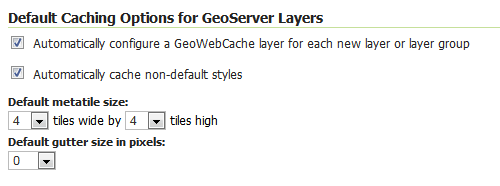
Default caching options
Automatically configure a GeoWebCache layer for each new layer or layer group
This setting, enabled by default, determines how layers in GeoServer are handled via the embedded GeoWebCache. When this setting is enabled, an entry in the GeoWebCache layer listing will be created whenever a new layer or layer group is published in GeoServer. Use this setting to keep the GeoWebCache catalog in sync. (This is enabled by default.)
Automatically cache non-default styles
By default, only requests using the default style for a given layer will be cached. When this setting is enabled, all requests for a given layer, even those that use a non-standard style will be cached. Disabling this may be useful in situations where disk space is an issue, or when only one default style is important.
Default metatile size
A metatile is several tiles combined into a larger one. This larger metatile is generated and then subdivided before being served back (and cached) as standard tiles. The advantage of using metatiling is in situations where a label or geometry lies on a boundary of a tile, which may be truncated or altered. With metatiling, these tile edge issues are greatly reduced.
Moreover, with metatiling, the overall time it takes to seed the cache is reduced in most cases, when compared with rendering a full map with single tiles. In fact, using larger metatiling factors is a good way to reduce the time spent in seeding the cache.
The disadvantage of metatiling is that at large sizes, memory consumption can be an issue.
The size of the default metatile can be adjusted here. By default, GeoServer sets a metatile size of 4x4, which strikes a balance between performance, memory usage, and rendering accuracy.
Metatiling threads
After a metatile (see above) is produced, it is then split into a total of 16 individual tiles to be encoded and saved to the cache. By default, a user requested tile will be encoded and saved on the main request thread but the remaining tiles will be encoded and saved on asynchronous threads to decrease latency experienced by the user.
Leaving this value blank will use a default thread pool size, equal to 2 times the number of cores. Setting to 0 will disable concurrency and all tiles belonging to the metatile will be encoded/saved on the main request thread.
This setting only affects user requests and is not used when seeding (seeding will encode an entire metatile on each seeding thread).
Default gutter size
The gutter size sets the amount of extra space (in pixels) used when generating a tile. Use this in conjunction with metatiles to reduce problems with labels and features not being rendered incorrectly due to being on a tile boundary.
Default Cache Formats
This setting determines the default image formats that can be cached when tiled requests are made. There are four image formats that can be used when saving tiles:
PNG (24-bit PNG)
PNG8 (8-bit PNG)
JPEG
GIF
The default settings are subdivided into vector layers, raster layers, and layer groups. You may select any of the above four formats for each of the three types of layers. Any requests that fall outside of these layer/format combinations will not be cached if sent through GeoServer, and will return an error if sent to the GeoWebCache endpoints.
These defaults can be overwritten on a per-layer basis when editing the layer properties.
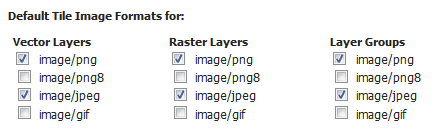
Default image formats
Skip caching on dimension warnings
WMS dimension handling can be complex, with ability to return tiles where the specified time was not a match, or when the request contained no time at all. This may not be a good match for tile caching, as it breaks the unique link between URL and tile content.
The following settings allow to disable caching when a WMS dimension warning is issued:
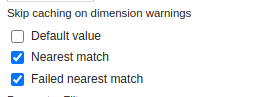
Skip caching on cache warnings
The best settings depend on the type of dataset and disk-quota configurations:
For static datasets with dimensions, the default value skip could be removed, as it’s going to generate at most one copy of the tiles. The nearest match and failed nearest could be cached if there is a disk quota (to speed up clients that repeatedly fail to perform an exact time match), but it’s best not to cache it if there is no disk quota, as the mismatches can be potentially infinite, leading to an uncontrolled growth of the cache.
For a datasets growing over time, it’s better to disable caching on the default value, as it’s often the “latest”, that is, the most recently added to the dataset. This means the tiles contents change based on when they are asked for. The considerations for nearest and failed matches are the same as for the static datasets.
Caution is advised if the data ingestion might happen to skip some time/elevation values, to fill them only at a later time. In this case, nearest matches could cause the system to cache a tile for a nearby time value, which would hide the actual values if they get ingested at a later time.
Default Cached Gridsets
This section shows the gridsets that will be automatically configured for cached layers. While there are some pre-configured gridsets available, only two are enabled by default. These correspond to the most common and universal cases:
EPSG:4326 (geographic) with 22 maximum zoom levels and 256x256 pixel tiles
EPSG:900913 (spherical Mercator) with 31 maximum zoom levels and 256x256 pixel tiles

Default gridsets
To add a pre-existing grid set, select it from the Add default grid set menu, and click the Add icon (green circle with plus sign).
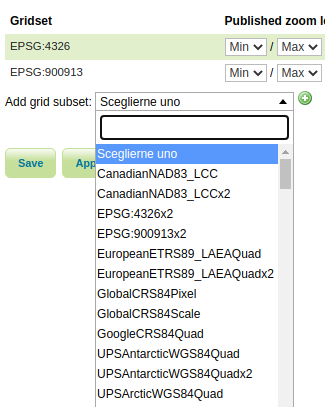
Adding an existing gridset to the list of defaults
These definitions are described in more detail on the Gridsets page.